Every guidance item that you create will show in the Guidance tab of the admin assistance panel.
To add a new item, in your WordPress admin, go to Admin Guidance > Add New Guidance Item. There you will see the following screen:
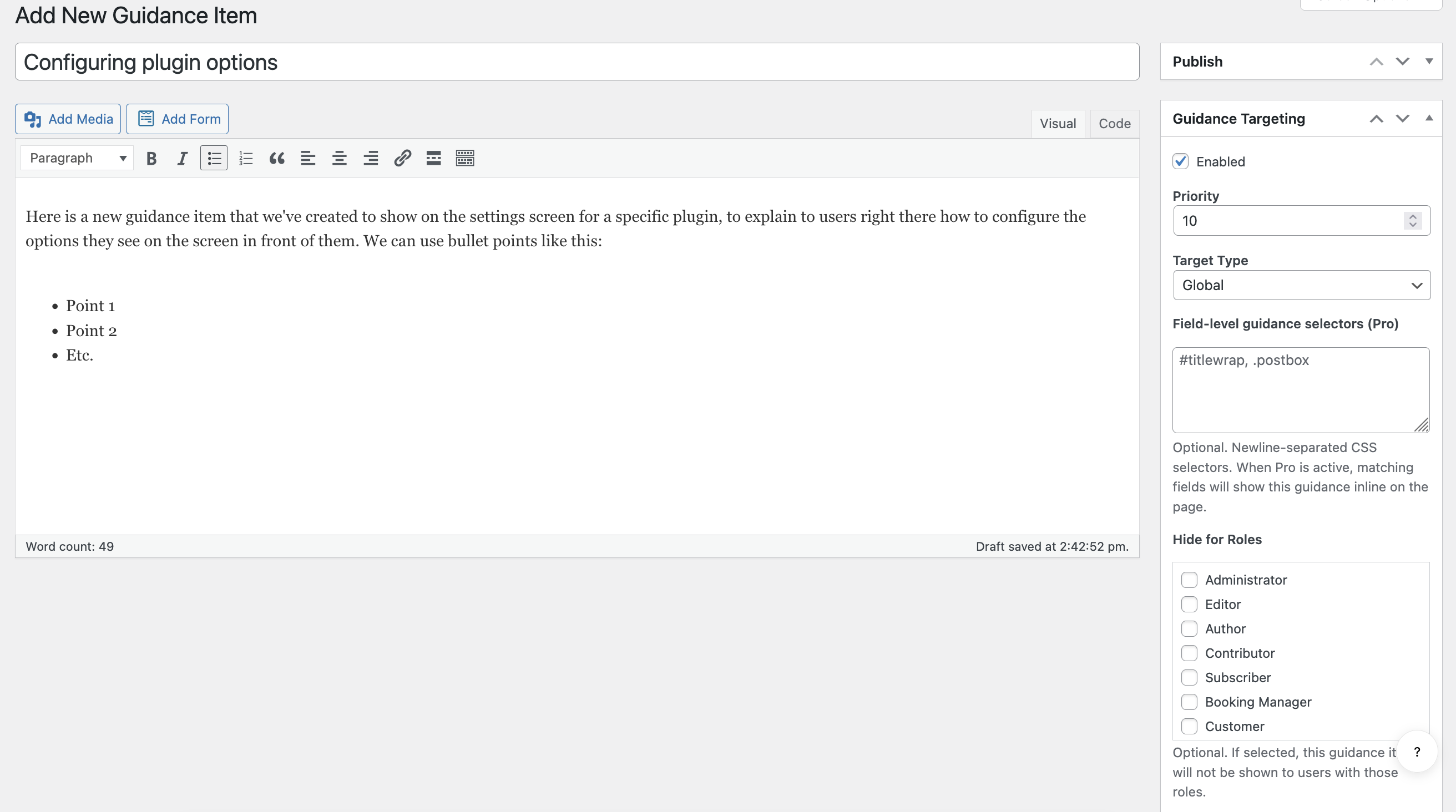
On this screen, you can set the following info for the guidance item:
- Make sure to enter a brief, but descriptive title.
- The body text will be the main guidance. This is where you will explain and include all the help info that you want to impart to the user.
- Guidance Targeting panel. Here you can do the following:
- Enabled: Unchecking this disables this guidance item. (It’s enabled by default.)
- Priority: This lets you decide the order in which guidance items will show in the admin assistance panel.
- Target Type: Here is where you choose exactly where this guidance will show. You can set this to:
- Global: It will show in the panel on all admin screens.
- Post type: It will show on all admin screens for a specific post type. You select which post types from the list you see here.
- Taxonomy: It will show on all admin screens for a specific taxonomy. You select which taxonomies from the list you see here.
- Admin screen: This lets you type in the ID of the exact specific screen you want this guidance item to show on.
- Hide for Roles: This lets you hide this guidance item from specific WordPress user roles.